A report records what you observed under that run’s conditions. Repeat unclear findings, note the conditions, and decide whether professional inspection or service is needed.
Choose the label that matches your observation
You choose the result. The website does not derive a verdict from patterns or reference illustrations. Enlarged points, patches and gaps in examples explain what to look for; they do not show the state of your screen.
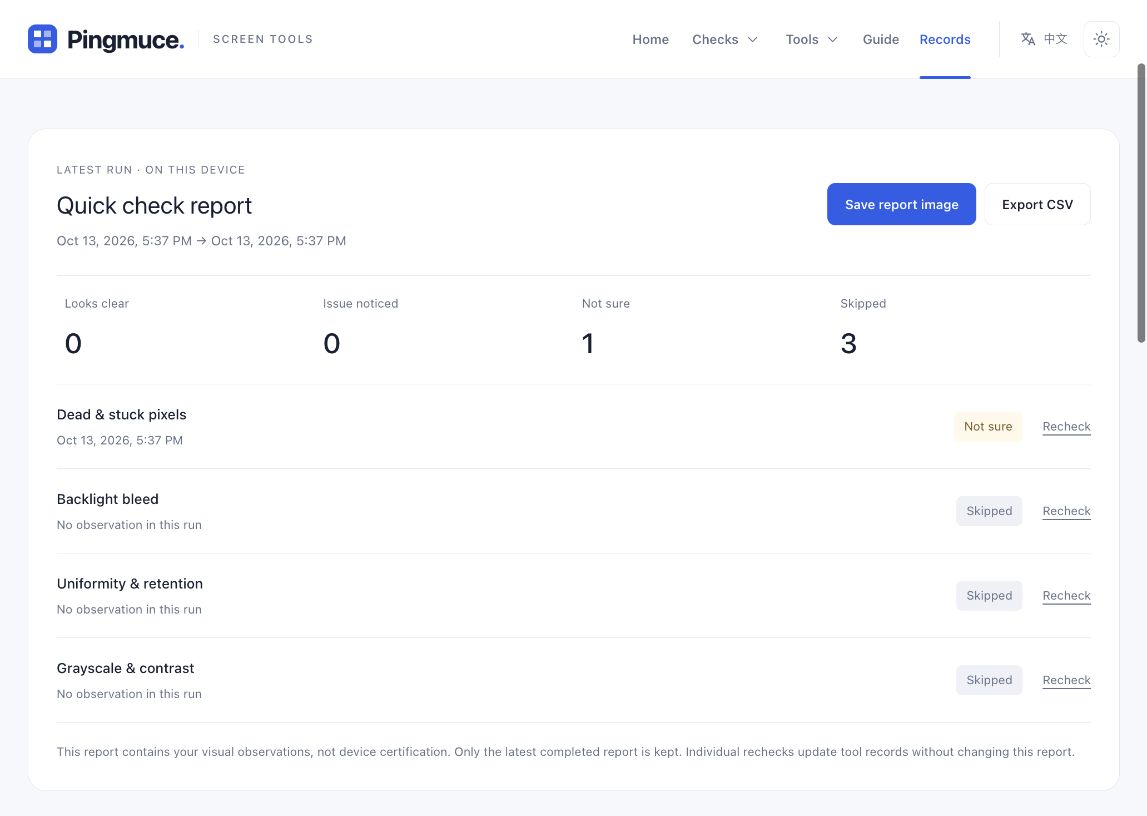
- Looks clear
You noticed no difference worth recording in this check. It does not guarantee that every condition is clear.
- Issue noticed
You saw something worth recording and rechecking, such as a repeated fixed point. This does not itself confirm hardware damage.
- Not sure
You inspected the pattern but cannot yet separate settings, surroundings or screen behavior.
- Skipped
This run did not inspect the item. The report does not fill it with a previous result.
Recheck in a repeatable order
Change one condition at a time. Keep brightness steady while comparing backgrounds, then keep a background steady while comparing viewing angle. Changing everything together makes the cause difficult to understand.
Rule out surface interference
Rule out dust, fingerprints, protectors and reflections.
Repeat under the same conditions
Repeat with the same pattern, brightness and viewing position.
Compare patterns and note changes
Compare related backgrounds and note which conditions reveal it.
Check ordinary content
Compare with ordinary content to see whether it remains visible or affects use.
Record the conditions as well as the finding
Separately note device model, location, pattern or background, brightness, display mode and whether the finding repeats. For example: small dark point at upper right on white, remains after cleaning, less visible on black. The report does not automatically read device model, physical brightness or monitor settings.
Note photo conditions when documenting a finding. Camera exposure particularly affects bright patches on black, so pictures of the same screen can look very different. Photo brightness alone cannot grade severity.
Save an image or export a table
A completed device flow summarizes observations from that run. Save report image downloads a PNG for viewing or sharing; Export CSV creates a file for spreadsheet software. If export fails, retry; the current report remains available.
Reports, screenshots and photos serve different purposes
These three records preserve different information and complement one another. Choose the one that documents what you need to explain.
| Record type | What it captures |
|---|---|
| Test report | The observations you selected and the items in this run. |
| Screenshot | The software picture; it generally does not show physical dead points or bleed. |
| Screen photo | A visible physical appearance, affected by exposure, angle and surroundings. |
When to ask for further inspection
If a finding repeats reliably and affects ordinary display or touch use, bring its location, conditions and photos to the maker or service team. Warranty, repair and replacement decisions depend on the device and maker’s policy, not the website report.
A complete inspection includes preparation, observation, rechecking and recording. For a specific question, revisit the observation guide beside its tool and repeat under comparable conditions.